


3-in-1 Wireless Charging Station for iPhone & Apple Watch

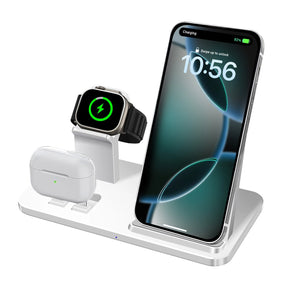
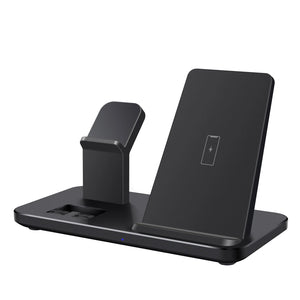
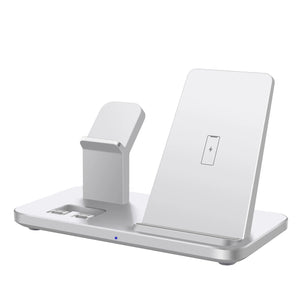
Keep your everyday devices powered, organized, and ready to go with this 3-in-1 Wireless Charging Dock Station. Designed for a clean and convenient charging setup, this compact charging stand lets you charge your compatible iPhone, Apple Watch, and wireless charging accessories in one place, helping reduce cable clutter on your desk, bedside table, or workspace.
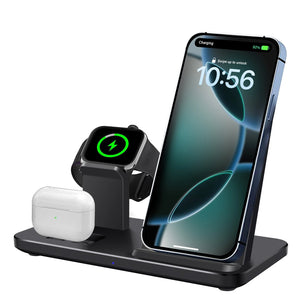
Its space-saving design keeps your devices neatly positioned while charging, making it a practical addition to your home, office, or travel setup. The upright dock design also makes it convenient to check notifications or view your phone while it is charging.
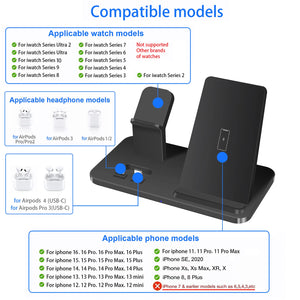
This wireless charging station is designed for compatible iPhone 18, iPhone 17, iPhone 16, iPhone 15 models and Apple Watch devices. Before purchasing, make sure your specific device supports the required wireless charging standard and that the charging dock configuration is compatible with your devices.
Key Features
-
3-in-1 Charging Design: Conveniently charge multiple compatible devices from one organized charging station.
-
Wireless Charging Convenience: Reduce cable clutter with a simple wireless charging setup.
-
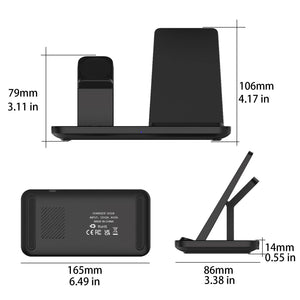
Space-Saving Design: Keeps your devices organized and neatly positioned in one place.
-
Stable Charging Stand: Designed to hold your devices in a convenient viewing position while charging.
-
Desk & Bedside Friendly: Perfect for nightstands, work desks, offices, and home charging areas.
-
Travel-Friendly: Compact design makes it convenient to take along when traveling.
How to Use
-
Place the charging station on a stable, flat surface.
-
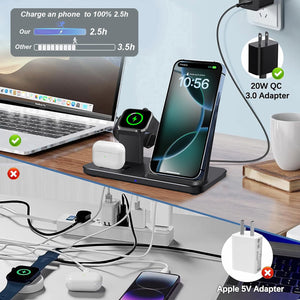
Connect the charging dock to a compatible power adapter.
-
Place your compatible iPhone on the designated wireless charging area.
-
Place your Apple Watch on its compatible charging position.
-
Make sure each device is correctly aligned with the charging area.
-
Check your device's charging indicator to confirm that charging has started.
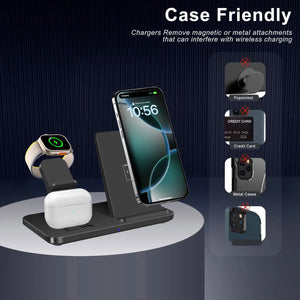
Note: Charging performance may vary depending on the device model, power adapter, case thickness, and other factors. Remove unusually thick or metal cases if wireless charging does not start properly.
Why You'll Love It
Say goodbye to messy charging cables and keep your essential devices together with a clean, convenient charging solution. Whether you're setting up your bedside table or organizing your workspace, this 3-in-1 Wireless Charging Dock helps create a more organized and modern charging experience.


